Security, GDPR and your clients' data
Where your clients' data is held, who is controller and who is processor, where to find our Data Processing Agreement and subprocessor list, and how to handle clients' data requests.
Updated 4 November 2026
Your clients trust you with some of the most sensitive information they will ever share. This article explains how their data is looked after in Therasee, what the UK GDPR roles mean for you in practice, and where to find the legal documents you may be asked for by a client, a supervisor or a professional body. It reflects the product and our published documents, and isn't legal advice.
The documents, and where to find them
- Data Processing Agreement (DPA): therasee.com/dpa. It is written under Article 28 of the UK GDPR (and the EU GDPR), forms part of our Terms of Service, and applies from the day you first use Therasee, so there is nothing to sign. Use Download PDF on that page for a copy.
- Subprocessor list: Schedule 3 of the DPA, Approved Sub-processors.: each provider, its purpose, the data it handles and where.
- Security measures: Schedule 2 of the DPA, Technical and Organisational Security Measures.
- Retention and deletion: Schedule 4 of the DPA, Data Retention and Deletion.
- Privacy Policy: therasee.com/privacy, and Terms of Service: therasee.com/terms.
Therasee is registered with the Information Commissioner's Office (ICO) under reference ZB610705.
Who is responsible for what
For your clients' data, you are the data controller and Therasee is the data processor. In plain terms, you decide why and how your clients' information is used, and Therasee processes it on your behalf, only on your instructions and as the DPA sets out.
As controller, the DPA and our Terms say you are responsible for:
- having a lawful basis for processing your clients' data, including an Article 9 condition for health and mental health information. Schedule 5 of the DPA sets out the bases commonly relied on by therapists, as a starting point for your own records rather than a decision made for you;
- giving your clients a privacy notice that tells them their data is processed by Therasee and its subprocessors;
- obtaining any consents you rely on, and responding to your clients' data protection requests.
Therasee is a separate controller for a small amount of data about you as an account holder: your account and billing details, your support conversations and product usage analytics. That is covered by the Privacy Policy rather than the DPA.
Where your data is held
According to the DPA and Privacy Policy:
- The Therasee application, sign-in service, file storage and video sessions run on Google Cloud in London (the europe-west2 region). Uploaded files, documents, exports and invoices are stored there.
- The main database, which holds client records, sessions, messages, forms and billing records, runs on Microsoft Azure in the UK (UK South).
- Appointment emails and SMS are sent through Microsoft Azure Communication Services in the UK.
- A small number of subprocessors can process data in the EU: Stripe for payments (with US processing covered by Standard Contractual Clauses), and an alternative video service described below. The DPA explains the safeguards for each.
If you practise in the EU, the DPA covers the EU GDPR as well as the UK GDPR.
How the data is protected
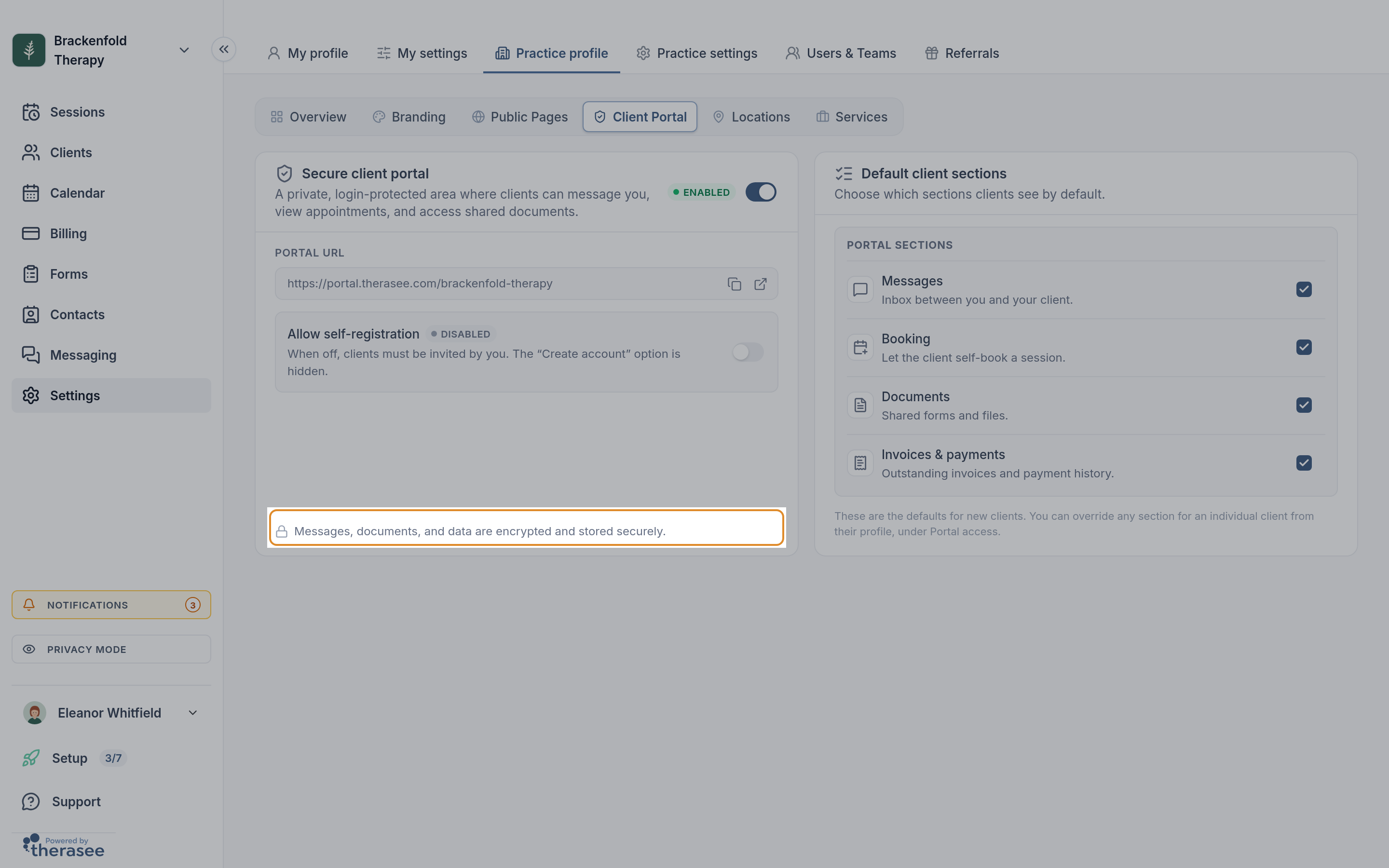
Schedule 2 of the DPA describes the measures in full. In summary, it states that data is encrypted in transit (TLS 1.2 or higher) and at rest (AES-256 or equivalent), that access to production systems is restricted to authorised staff using multi-factor authentication, that access to and changes to personal data are recorded in audit logs, and that regular automated backups are kept in UK infrastructure. You'll see a short reminder of this in Settings, Practice profile, Client Portal: Messages, documents, and data are encrypted and stored securely.
Who can see what
Your clients never see your session notes. Notes don't appear in the client portal and aren't included in anything clients are sent. Clients only see what you share with them through the portal, such as their appointments, the forms you send, their invoices and your messages. See Writing session notes and Turning on the client portal.
Your team only sees what you allow. If other people work in your practice, give each of them their own login rather than sharing yours, so that what they can see is controlled and their activity is recorded under their own name. In Settings, Users & Teams, each person has a role (Owner or User), a Member type (Practitioner or Admin; admin users start with no access to client documents and notes) and separate View access and Edit access for Clients & Contacts, Client documents & notes, Invoices & payments, Calendars & scheduling and Practice settings. For client information you can choose All clients, Assigned only (the clients assigned to them) or None.
Protect your own sign-in. Turn on two-factor authentication in Settings, My settings, Security, so that a password alone isn't enough to get into your account. Signing in and two-factor authentication walks you through it. Therasee also signs you out automatically after a period of inactivity.
Working somewhere others can see your screen? Select PRIVACY MODE at the bottom of the left-hand menu. Client names are shown as initials across the app, and other personal details are blurred until you click to reveal them. It applies to your login only.
Video sessions
The DPA and Privacy Policy state that video sessions run on video infrastructure Therasee operates itself on Google Cloud in London, are encrypted in transit, and are not recorded, with no session content stored. Jitsi as a Service, provided by 8x8 and hosted in the EU, is kept as an alternative video service, for example during maintenance; it doesn't record sessions either. See Running a video session.
Optional features that share data
- Calendar sync. If you connect Google Calendar or Outlook, only the appointment date and time, session type, client initials and the location or video link are sent to your calendar: no client names or email addresses. See Syncing Google or Outlook calendar.
- AI form assistant. Optional. The DPA says it runs in Google Cloud in London, client data variables are masked before anything is sent, nothing is kept after the request and nothing is used for model training. Use blank templates when converting documents.
- Dictation. Speech-to-text runs on Microsoft Azure in the UK, and the DPA states no audio is retained.
When a client asks for their data, or asks you to delete it
Because you are the controller, a client's request to see, correct or erase their data is made to you, and you decide how to respond. Under the DPA, Therasee assists you with these requests, and if a client contacts Therasee directly we tell you rather than answering them ourselves.
To gather a client's data for a subject access request:
- Go to Clients and select the download button, Export clients, at the top right. It appears on a computer-sized screen for team members who can edit all clients.
- Tick the client.
- Under Export options, choose what to include: Demographics (always included), Appointments, Clinical notes, Attachments and Forms.
- Select Export. When you see Export ready!, copy the Download URL and open it to download a ZIP file. The link lasts 48 hours.
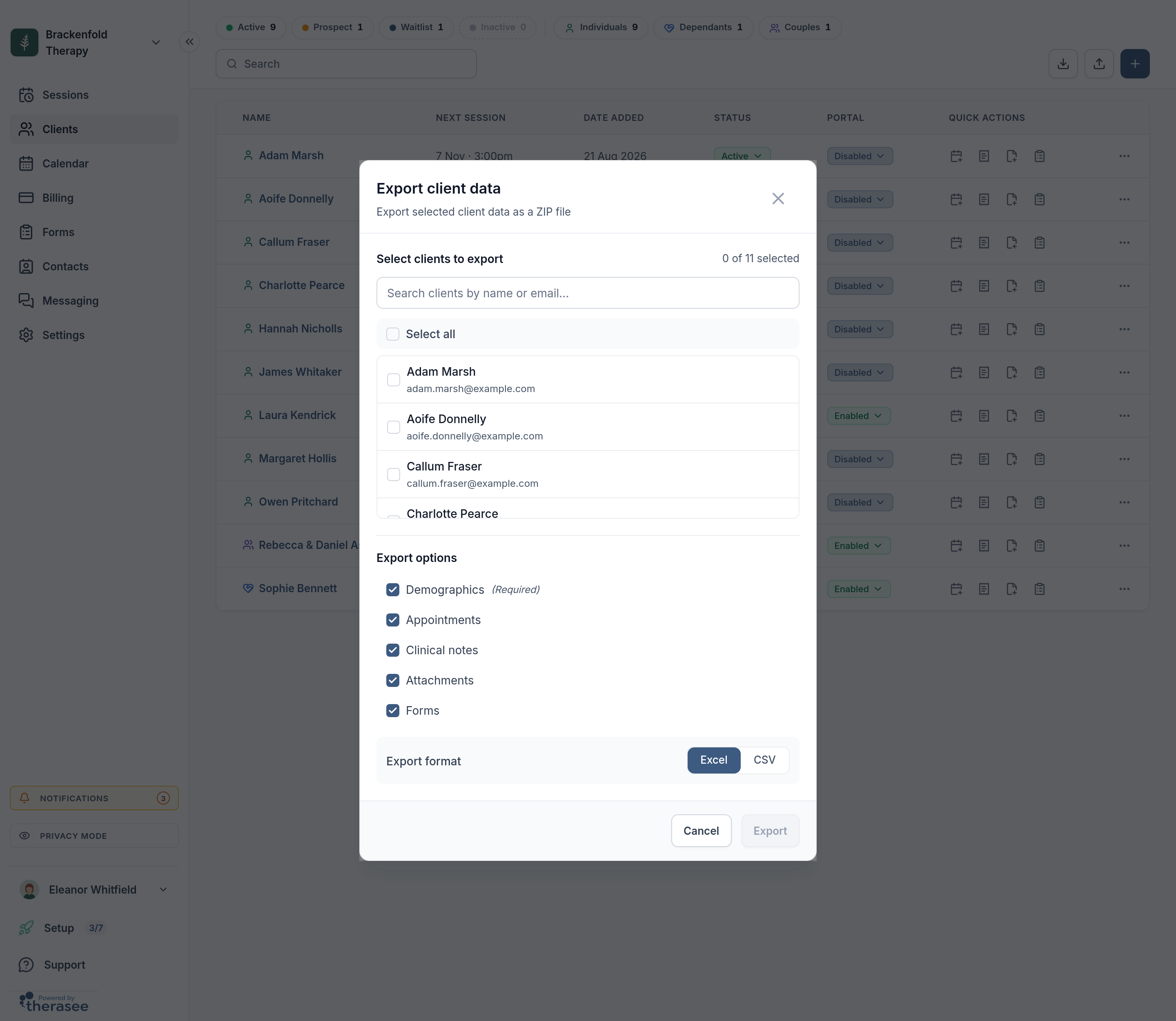
The export does not include invoices or messages. Download each of the client's invoices as a PDF with Download in the ... menu on its row in Billing. If you need the client's message history, email privacy@therasee.com and we will help you gather it.
Review the export before you share it: what to disclose, and whether anything should be withheld, is your decision as controller. For an erasure request, decide first what you need to keep for your professional record-keeping duties, then email privacy@therasee.com so we can help you carry it out. For your own account, Closing your account explains how to delete your practice account and what happens to your data afterwards.
If something goes wrong
The DPA commits Therasee to tell you without undue delay, and within 72 hours at most, of becoming aware of a personal data breach affecting your clients' data, with what happened, the likely consequences and what is being done. We then work with you to investigate and put things right.
If you think your own account has been compromised, for example a lost laptop or a password someone else may know, change your password straight away and email support@therasee.com. As controller, you decide whether a breach needs to be reported to the ICO; the ICO's website explains the rules.
For any other data protection question, including information you need for an audit or a risk assessment, contact privacy@therasee.com.
Was this helpful?