
Your Brand
Your practice in front of every client, not ours
Your logo and colour on your booking page, client portal, contact form, waitlist and invoices, and your name and logo on client emails and the video waiting room.
How it works
See it in action
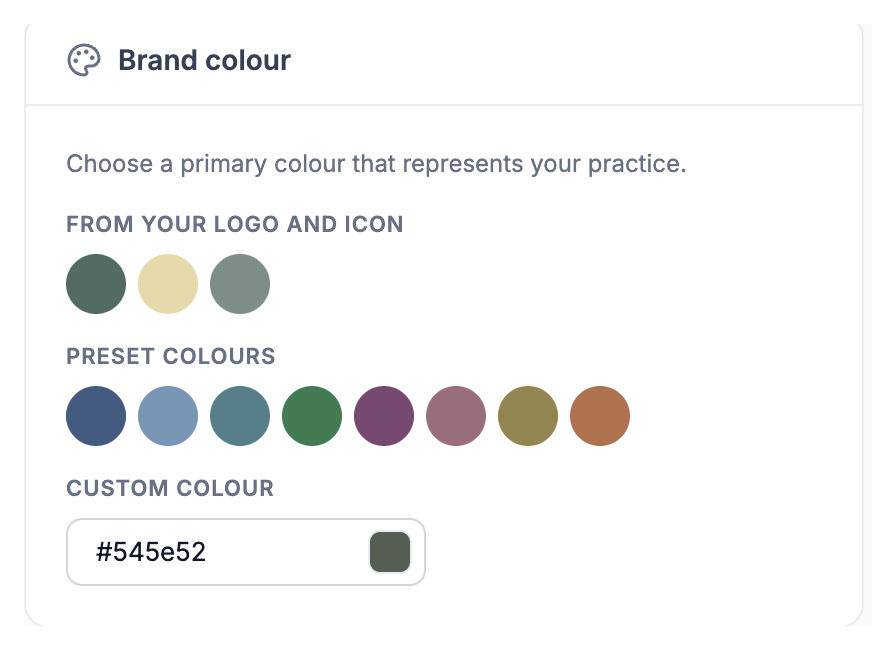
Pick one of the colours taken from your logo, a preset, or your own. Text on it switches between light and dark so it always stays readable.


Everything you need
Powerful features designed for the way you work.
- Logo, or icon and name
- Upload a square icon and a wide logo, then choose which clients see, in small, medium or large.
- Colours from your logo
- Therasee suggests colours taken from your logo, alongside eight presets or any colour you like.
- Always readable
- Text on your colour switches between light and dark automatically.
- Your own app icon
- Clients who add the portal to their phone see your logo and practice name, not ours.
- Branded payments
- The card payment page shows your logo and practice name.
- Set once
- Change your colour and it updates everywhere at once, with a preview before you look.
Before & after Therasee
See what changes when you switch to a purpose-built platform.
Without Therasee
With Therasee
Without: Clients land on pages that look like someone else's software
With Therasee: Your logo and colour on every page they see
Without: Invoices that don't look like they come from you
With Therasee: Invoices in your style, on screen and as a PDF
Without: A generic app icon on your client's phone
With Therasee: Your logo and name as the icon when they add the portal
Your Brand: your questions answered
Can I put my own logo and colours on Therasee?
Yes. Your logo and colour go on your booking page, client portal, contact form, waitlist and invoices, and client emails come from your practice name with your logo. Change your colour once and it updates everywhere.
Can clients have an app with my logo?
Yes. When clients add the portal to their phone, the app icon is your logo with your practice name.
Can I style my invoices?
Yes. Choose the layout, which logo to show and its size, a background and the spacing. Invoices match on screen, in the portal and as a PDF.
Does my logo appear in video sessions and payments?
Yes. Your logo welcomes clients in the video waiting room and stays in the call, and the card payment page shows your logo and practice name.
What if I am not sure which colour to use?
Therasee suggests colours taken from your logo, alongside eight presets or any colour you like. Text on your colour switches between light and dark so it always stays readable.



Ready to try Your Brand?
Start for free and see how Therasee changes the way you run your practice. No credit card required.