Buying and using a session package
Buy a package of sessions from your practitioner, book sessions with it and see how many you have left.
Updated 19 November 2026
Some practices sell sessions in packages: a set number of sessions for one price, for example 6 sessions for £390. Once you've paid for a package, each session you book with it is paid for from the package, so there's nothing more to pay when you book.
Buying a package when you book
Start a booking from your practitioner's booking page, or from your client portal.
Under Packages, below the services, choose a package. Each one shows the services it covers, the price per session, how long you have to use it, and how many sessions it has.
If the package covers more than one service, choose the service for your first session. Then choose where and when, as for any booking.
On Review and pay, check the details. Under Payment it explains that this session uses the first session of your package, and how many are added to your account for later.
Select Pay and the amount, then pay by card on the next screen. Your package and your first session are set up once your payment goes through.
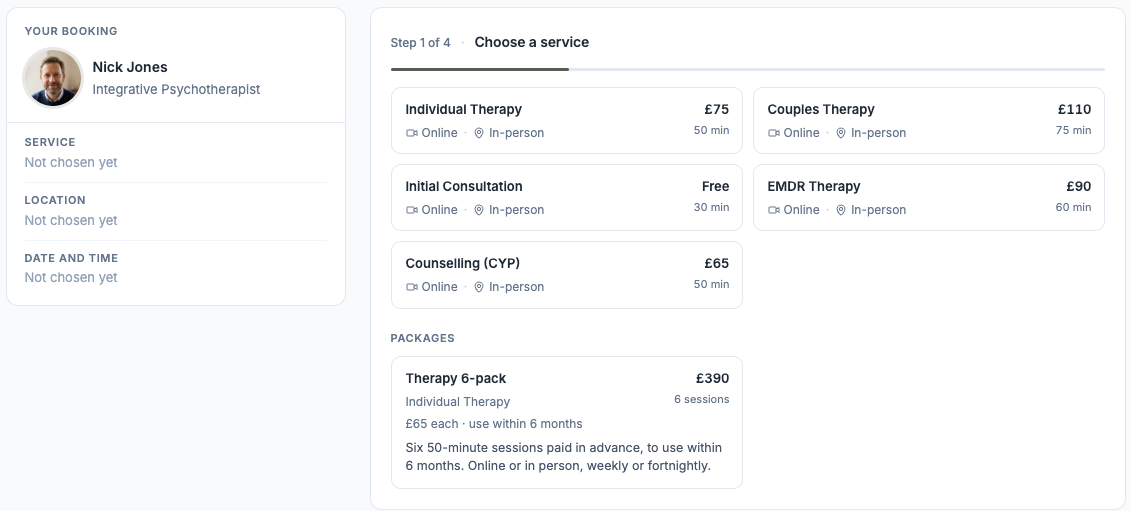
Packages show below the services when you book.
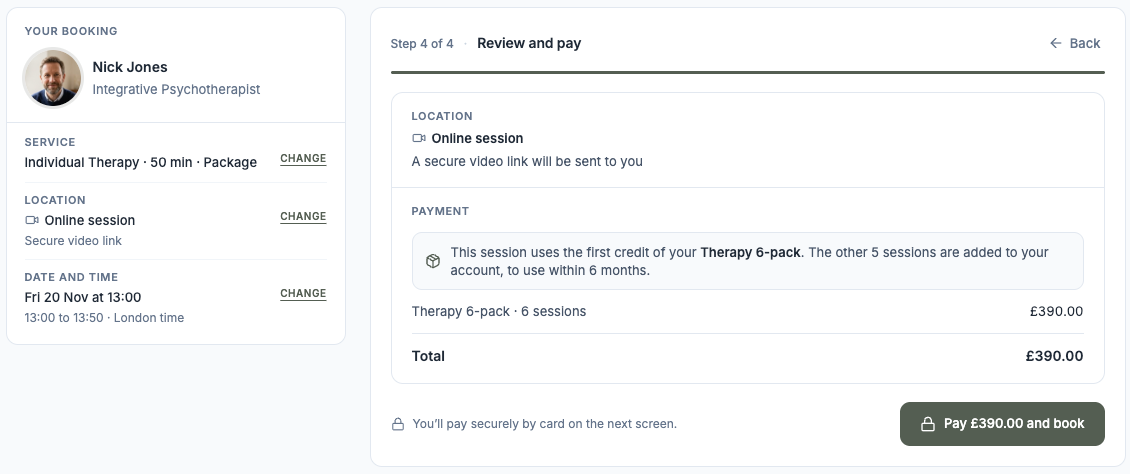
Review and pay for a package and your first session.
Buying a package from your Packages page
Once you have a package, Packages appears in your client portal menu. Under Buy a package or Buy another package you see the packages your practitioner offers you, with the number of sessions, the price and how long it's valid for. Select Buy and pay by card on the next screen.
Your practitioner can also sell you a package on an invoice. It shows as Awaiting payment and starts once the invoice is paid. See Viewing and paying your invoices.
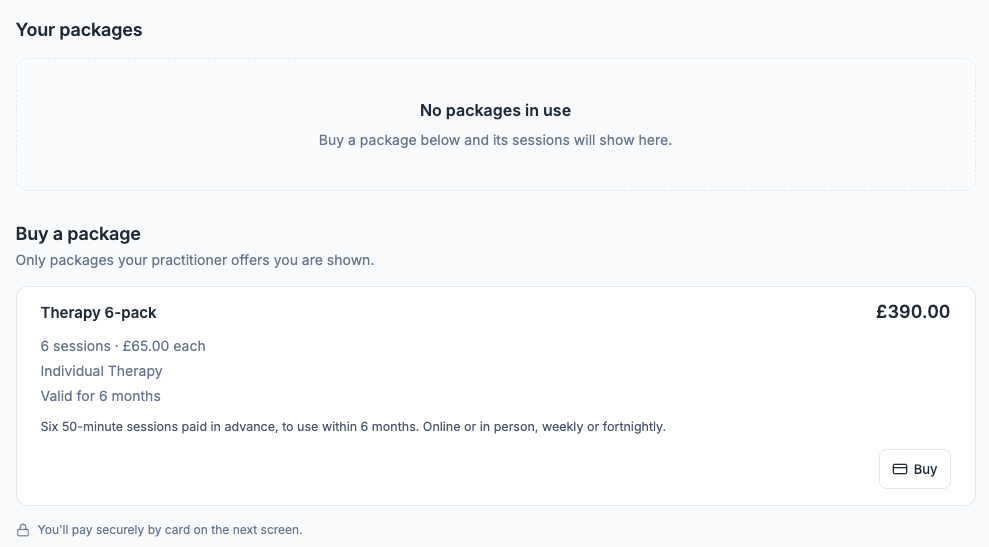
The Packages page in your client portal.
Booking sessions with your package
When you book a service your package covers, the package is used for you. When you choose a service, a note says how many sessions you have left, and the services it covers are marked Package. On the review step it says the session is paid with 1 credit from your package and how many you'll have left, and the total is £0.
Your practitioner can also book sessions for you that use your package.
Cancelling a session
If you cancel in good time, the session goes back to your package. If it's too close to the session, it doesn't come back. The cancel screen tells you which before you confirm, and the review step when you book says how far ahead you need to cancel.
Seeing what you have left
Open Packages in your client portal. Under Your packages, each package shows how many sessions you have left, your next session and the date to use them by. Select Book a session to book with it, or View history to see what each session did. Packages that have expired or been used up are under Past packages.
Reminder emails
Your practice may email you 14 days before your package expires, and when you have one session left.
Can't see a package?
You only see the packages your practitioner offers you, and only for services you can book. If you were expecting one, message your practitioner.
Was this helpful?